Category ArchiveBlog Technology
Blog Technology &OneNote &Tips and Tutorials Isaac on 25 May 2007
How to Blog from OneNote 2007
Since I’ve been asked and I thought it might be generally useful for people to know… Near as I can tell, this requires OneNote 2007 and Word 2007, but I haven’t tried it extensively since I’ve only got the 2007 trials on my review X60 (my own X41 is running 2003).
In OneNote 2007, create the blog entry on a single page.
If you want handwritten stuff to stay handwritten, select it and go to Tools > Treat Selected Ink As > Drawing (otherwise it tends to turn into plain text, which isn’t so good if your handwriting is as illegible as mine can be sometimes).
Go to File > Send To > Blog. This will send you off to Word 2007, where you configure your blog settings, do any final editing, and actually post the thing.


Blog Technology &OneNote Isaac on 19 May 2007
Another Attempt to Blog from OneNote
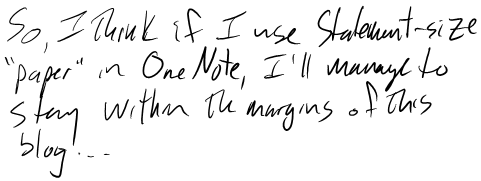
So, I think if I use statement-size “paper” in OneNote, I’ll manage to stay within the margins of this blog…
Blog Technology &Off-Topic &Tips and Tutorials Isaac on 17 May 2007
Stealth Blogging
Though I’ve been terribly tempted to spend entire meetings posting making blog posts, I’ve thus far managed to hold back the urge. jkOnTheRun’s Stealth Blogging Primer is a pretty good indication that I’m not the only one multitasking with my tablet and others have put a lot of thought into it:
Stealth blogging is blogging from any location where you typically are not supposed to blog. For me that usually means long, boring meetings where my presence has been requested but in reality is not required. So for me, lots of boring dead time Tablet PC EV-DO = Stealth Blogging.
Blog Technology &Misc Ink-Enabled Apps &OneNote Isaac on 16 May 2007
Trying New Things

So apparently I can blog from OneNote 2007…
About TTPC &Blog Technology Isaac on 04 Apr 2007
A Few Changes to the Site
Since I’m on spring break and have time to think about and do such things (read that as “have a stronger-than-usual desire to procrastinate”), I’ve done a little tweaking with the site. I’ve added a contact form, added the ability to subscribe via email, and added a page on subscribing (see the links across the top of the page). I’ve also disabled the forums for the moment, since the only use they seemed to be getting was collecting registrations with (mostly fake) Russian email addresses. If there’s sufficient interest in forums in general, I may bring them back or rebuild them using bbPress instead of pubBB. Also, those of you reading this via a feed (i.e. subscription, RSS, Google Reader, etc.) have probably noticed the addition of ads by Pheedo—at the moment, this is the only option available to me for placing ads in the feeds, which I feel is appropriate given that I have Google ads on the web site (if it were possible to put more minimal ads, preferably Google text ads, into the feeds, I would do that instead).
About TTPC &Blog Technology Isaac on 11 Mar 2007
Slight Design Update
Though I doubt many of you will notice, I’ve made a very slight update to the design of this site. This site no longer has a horizontal scrollbar when viewed in portrait mode on a 1024×768 (or is that 768×1024?) tablet, at least for me in Firefox. I no longer remember where I saw the offhand comment about how few Tablet PC sites actually fit on screen horizontally in portrait mode, but the thought has been percolating ever since and, spurred by a desire to procrastinate combined with the earlier technical work of fixing DST on several OpenBSD boxes I, finally made this site fit.
About TTPC &Blog Technology Isaac on 03 Mar 2007
I Almost Missed a Day
I can’t believe I almost missed posting today. I’m actually more surprised that I’ve been able to stick to my goal of posting every day for this long.
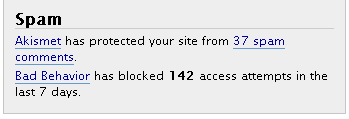 Also along the lines of things I can’t believe and/or things that surprise me, the number of blocked access attempts reported by Bad Behavior has just about doubled this week. I don’t think a single spam comment has made it through to the blog, though, and I’ve only had to delete a handful of spam that Akismet has caught. (Oh, and if I’m remembering correctly, Bad Behavior doesn’t default to showing its block count in the dashboard with Akismet’s spam count and I hacked that in there—comment if you want details.)
As long as I’m off on one of these mechanics-of-a-blog-site posts, I might as well publicize that if you upgraded to WP2.1.1, you really must upgrade to WP2.1.2 right now.
About TTPC &Blog Technology Isaac on 20 Feb 2007
WordPress Plugins
Since I already posted about the upgrade to WP2.1 this week, I thought I might as well post a list of the plugins I’m using. This should automatically update, since (as listed below) I’m using WP-Plugin List.
- Akismet v2.5.1
Used by millions, Akismet is quite possibly the best way in the world to protect your blog from comment and track-back spam. It keeps your site protected from spam even while you sleep. To get started: 1) Click the “Activate” link to the left of this description, 2) Sign up for an Akismet API key, and 3) Go to your Akismet configuration page, and save your API key. Automattic - Bad Behavior v2.0.38
Deny automated spambots access to your PHP-based Web site. Michael Hampton - Future Calendar v1.6.2
A simple plugin that utilizes a modified get_calendar function that shows what dates have a future post scheduled in a calendar format, and makes it easy to change the current timestamp. Includes a widget to display posts on your website. Aaron Harun - Linkblock widget v1.0
Displays one specific category of links; up to 9 instances of this widget may exist. Heavily derived from the Text widget code included with the widget plugin by Automattic, Inc. M. Holger - LiveContact v0.9b
A warm and fuzzy Web 2.0 contact form John Wyles - Feedburner Feed Replacement v2.2
Forwards all feed traffic to Feedburner while letting through some important User-Agents. Steve Smith - Permalink Redirect v1.0.1
Redirects all crap away from the end of the URL Joost de Valk - Role Manager v2.0.0
Role Management for WordPress 2.0.x and 2.1.. Thomas Schneider - Janrain Engage v1.0.1
Plugin to add authentication via the Janrain Engage service. forestb - Sociable v3.5.2
Automatically add links on your posts, pages and RSS feed to your favorite social bookmarking sites. Blogplay - WordPress.com Stats v1.7.5
Tracks views, post/page views, referrers, and clicks. Requires a WordPress.com API key. Automattic - Google Sitemaps v2.7.1
This generator will create a Google compliant sitemap of your WordPress blog. Arne Brachhold - Sociallist v1.5.1
Automatically add links on your posts to popular social bookmarking service. Go to Options -> Sociallist for setup. Codemaster - AskApache Search Engine Verify v3.5
Adds the verification meta tags to home page provided by Google and Yahoo AskApache - Do Follow v4.0
Removes the evil nofollow attribute that WordPress adds in comments. Denis de Bernardy - Simple Trackback Validation v2.1
Eliminates spam trackbacks by (1) checking if the IP address of the trackback sender is equal to the IP address of the webserver the trackback URL is referring to and (2) by retrieving the web page located at the URL used in the trackback and checking if the page contains a link to your blog. Michael Woehrer - WP-Plugin List v1.0
WP Plugin List is a simple plugin to allow yout post your current WordPress 1.5+ Martin Wiso - WordPress Database Backup v2.2.3
On-demand backup of your WordPress database. Navigate to Tools → Backup to get started. Austin Matzko - Google Adsense widget v1.0
Monetize with AdSense in your sidebar widgets! Mike Smullin - front page login v1.0
Adds a sidebar widget to allow logins on the front page Hermescb
About TTPC &Blog Technology Isaac on 19 Feb 2007
WordPress 2.1 Upgrade
If you happened to find this site any time yesterday afternoon, you probably caught me in the middle of upgrading to WordPress 2.1 Ella. So far, the differences are mostly small–there are a few plugins I wanted that only worked under 2.1, so I had to upgrade, but I was otherwise fine with 2.0.x. The post editor is probably the biggest difference, though it’s not all that different. The visual/code tab thing works well, autosave is nice, and spellcheck is always a good thing. If you find, as I did, that there are icons missing in the editor after upgrading, clear your browser cache and hopefully all will be resolved. Oh, and if you press Alt+V in IE or Alt+Shift+V in Firefox while in the editor, you get an additional bar of “advanced” buttons.
Blog Technology &Links Isaac on 13 Feb 2007
Ink Blogging
Ed Holloway’s Ink Blog Plugin for Windows Live Writer is very cool. I finally got around to upgrading both of them and I’m even happier with how well they work. Just beware that WLW still seems unable to recognize a title inserted with the ink-recognition modes of the tablet input panel (it’s only happy when I use the real or tap-on keyboards to put in the title).
InkBlogger at oneof.us looks really promising but development is currently stalled.


